
Last updated: 14 September 2026. This is an independent informational guide for UK travellers. For official information, always refer to visa.nadra.gov.pk.
To fix payment issues for Pakistan eVisa, first check if your UK bank blocked the cross-border transaction and call their fraud team to authorise it. If double-charged, wait 3 to 7 business days for an automatic reversal, then contact NADRA support with your transaction reference number. Standard fees are non-refundable per Ministry of Interior policy, but duplicate charges can be disputed via the NADRA contact form.
Why Your Pakistan eVisa Payment May Have Failed
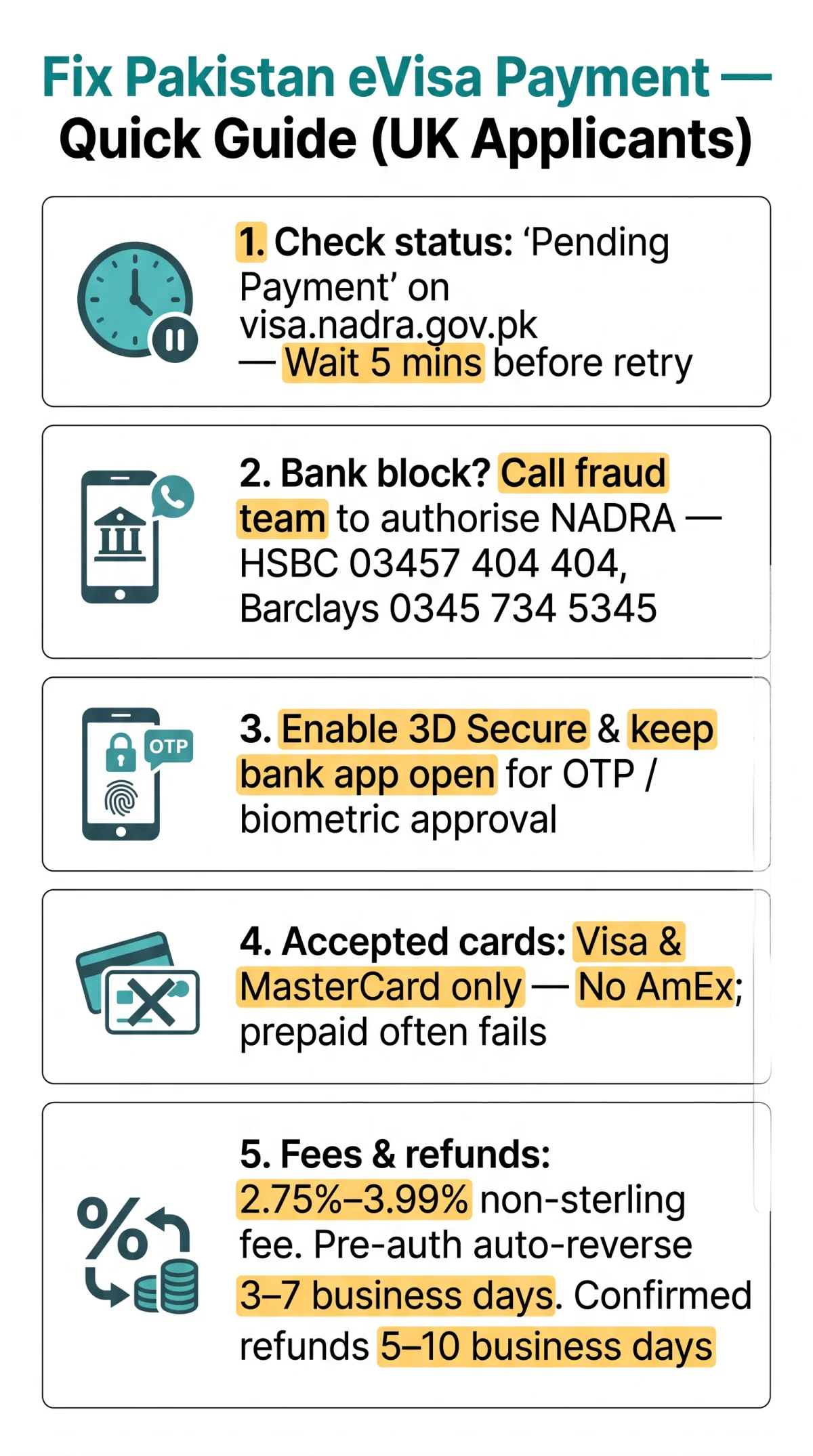
Pakistan eVisa payments commonly fail because UK banks block cross-border transactions or 3D Secure authentication times out. To fix a failed Pakistan eVisa payment, call your UK bank’s fraud team (HSBC: 03457 404 404, Barclays: 0345 734 5345) and authorise the NADRA merchant code. Payment is step 3 of 4 on the visa.nadra.gov.pk portal (Form, Documents, Pay, VGN), as outlined in our step-by-step application guide.
- Cross-border block: UK banks auto-block Pakistani merchant category codes (MCC). Call your fraud team to authorise the NADRA payment.
- 3D Secure failure: Keep your banking app open for OTP or biometric approval. If authentication times out, the transaction drops silently.
- Insufficient funds or expired card: Verify your card is valid and has enough balance plus a 2.75 to 3.99% non-sterling surcharge.
- Incorrect UK postcode formatting: Alphanumeric postcodes like SW1A 1AA cause NADRA gateway validation errors. Match your billing address exactly.
- Gateway session timeout: If the payment page freezes, do NOT refresh or re-submit. Wait 5 minutes and check your application status.
- Card not enabled for international transactions: Some UK debit cards are domestic-only by default. Call your bank to confirm.
Common Error Messages and What They Mean
| Error Message | What It Means and What To Do |
|---|---|
| Transaction Declined | Bank rejected the transaction. Call your UK bank’s fraud team and authorise the payment to NADRA. |
| Authentication Failed | 3D Secure OTP or biometric approval was not completed. Ensure your bank app is open before initiating payment. |
| Session Expired | The payment window timed out. Do NOT re-submit immediately. Check application status first. If “Pending Payment”, wait 30 minutes. |
| Payment Gateway Error | Temporary server issue on NADRA side. Wait 15 to 30 minutes and retry. |
| Invalid Card Details | Verify card number, expiry date, CVV, and billing address match your UK bank records exactly. |
Why Your UK Bank May Have Blocked the Transaction
UK banks use automated fraud filters that flag payments to Pakistani merchant category codes as potential fraud. To resolve a UK bank blocked Pakistan eVisa payment, call your bank’s fraud department, confirm you authorised the transaction, name “NADRA” as the payee for “Pakistan eVisa”, request a temporary cross-border exception, and retry within 30 minutes.
| UK Bank | Fraud Department Phone |
|---|---|
| HSBC | 03457 404 404 |
| Barclays | 0345 734 5345 |
| Lloyds | 0800 056 2092 |
| NatWest | 0800 161 5157 |
| Monzo | In-app support (24/7) |
| Starling | In-app support or 0207 930 4450 |
Accepted Payment Methods for Pakistan eVisa
The Pakistan eVisa portal accepts Visa Credit, Visa Debit, MasterCard Credit, and MasterCard Debit. American Express and most prepaid cards are not accepted. MoFA (mofa.gov.pk) confirms both Visa and MasterCard. Check the fee calculator for current Pakistan eVisa fees.
| Payment Method | Accepted? | Notes |
|---|---|---|
| Visa Credit Card | Yes | Highest reliability across the portal |
| Visa Debit Card | Yes | UK Visa Debit accepted |
| MasterCard Credit | Yes | Confirmed by MoFA (mofa.gov.pk) |
| MasterCard Debit | Yes | UK Debit MasterCard accepted |
| American Express | No | Not supported by NADRA gateway |
| Prepaid Cards | Unreliable | Some prepaid cards fail due to cross-border restrictions |
What Your UK Bank Will Actually Charge
UK banks charge 2.75% to 3.99% non-sterling transaction fees on Pakistan eVisa payments processed in USD or PKR. Monzo and Starling offer near-zero forex markups. Fees are approximate as of 2026 and subject to change.
| UK Bank | Non-Sterling Fee |
|---|---|
| Monzo | ~0% |
| Starling | 0% |
| HSBC | 2.75% |
| Barclays | 2.99% |
| Lloyds | 2.99% |
| NatWest | 2.75% |
How to Fix a Failed Payment Step by Step
To fix a failed Pakistan eVisa payment, confirm the application is still in “Pending Payment” status on the portal, enable 3D Secure on your card, clear your browser cache, and retry within the session window.
Check application status
Log back into visa.nadra.gov.pk and check application status.
Retry or wait for VGN
If “Pending Payment”, proceed to retry. If “Payment Confirmed” but no VGN received, wait up to 24 hours (normal latency).
Clear cache and enable 3D Secure
Clear browser cache and cookies. Ensure 3D Secure is enabled on your card.
Open your bank’s mobile app
Keep your bank’s mobile app open for OTP or biometric approval during checkout.
Complete payment
Complete payment within the session window. Use a stable internet connection.
Decision tree for page freeze: Wait 5 minutes and check status. If “Pending Payment”, wait 30 minutes and retry. If “Payment Failed”, start from step 1. If “Payment Confirmed”, wait for VGN. If charged twice, go to the double charges section below.
Failed Transaction Checklist Before You Retry
- Card is Visa or MasterCard (Credit or Debit), not Amex or prepaid
- 3D Secure is enabled; bank app is open for OTP
- Billing address matches your UK bank records (alphanumeric postcode, no special characters)
- Card is enabled for international transactions
- Sufficient funds to cover the fee plus potential non-sterling surcharge
- Browser cache cleared; stable internet connection
What to Do About Double Charges on Your Pakistan eVisa
To fix double charges for Pakistan eVisa, wait 3 to 7 business days for the pre-authorisation hold to auto-reverse. After that, extract your 23-digit ARN from your UK banking app (Monzo: Transactions, Tap charge, Details) and escalate to NADRA support.
Check your bank statement
Look for two identical or near-identical transactions to NADRA, then verify your application status on the Pakistan eVisa portal.
Wait if VGN issued
If a Visa Grant Notice (VGN) has been issued, the duplicate is likely a pre-auth hold. Wait 3 to 7 business days for automatic reversal.
Check again if no VGN
If no VGN after 24 hours, the payment may not have fully processed. Wait 30 minutes, check again, and if still pending, contact NADRA.
Escalate with ARN
If the charge persists after 7 business days, extract your ARN and submit a support ticket at visa.nadra.gov.pk/contact/.
| Scenario | Action | Timeline |
|---|---|---|
| Two charges, VGN issued | Wait for pre-auth auto-reversal | 3 to 7 business days |
| Two charges, no VGN after 24 hrs | Contact NADRA with ARN | Submit via contact form |
| Charge persists after 7 days | Escalate to NADRA and optionally contact your UK bank | 5 to 10 business days for resolution |
How to Extract Your Transaction Reference Number (ARN) from UK Banking Apps
The ARN is typically a 23-digit number starting with the card scheme prefix. Find it in your UK banking app:
| Banking App | How to Find the ARN |
|---|---|
| Monzo | Transactions, Tap the NADRA charge, Reference shown in details |
| Revolut | Transactions, Tap payment, Details, look for “Acquirer Reference Number” |
| HSBC Mobile | Account, Recent transactions, Tap charge, Reference field |
| Barclays | Accounts, Transaction history, Tap entry, Full details |
| Lloyds | Account, Statements, Tap transaction, Reference number |
How to Request a Refund for Pakistan eVisa
Refunds for Pakistan eVisa are possible only for verified duplicate charges. Standard Pakistan eVisa processing fees are non-refundable per Ministry of Interior policy (mofa.gov.pk), even if your application is rejected. Submit a support ticket with your bank statement and ARN via the NADRA contact form at visa.nadra.gov.pk/contact/.
| Scenario | Refundable? | Action |
|---|---|---|
| Standard fee paid, application processed or rejected | No | Non-refundable per Ministry of Interior policy (mofa.gov.pk) |
| Duplicate or erroneous charge (paid twice) | Yes | Submit a support ticket via visa.nadra.gov.pk/contact/ |
| Payment deducted but application still “Pending Payment” after 24 hrs | Potentially | Contact NADRA support with bank statement |
Template message for NADRA support ticket:
Subject: Duplicate Payment – Pakistan eVisa Application [Your Passport Number]
Dear NADRA Support Team,
I am reporting a duplicate payment for my Pakistan eVisa application. My passport number is [NUMBER]. My application ID is [NUMBER]. I was charged twice on [DATE] for a total of [AMOUNT]. The two transaction reference numbers (ARNs) from my UK bank are: [ARN 1] and [ARN 2].
My application status currently shows: [Pending Payment / Payment Confirmed / Payment Failed].
I have attached my bank statement showing both charges. Please investigate and process a refund for the erroneous duplicate charge.
Do NOT initiate a chargeback with your UK bank unless you are certain it is an erroneous duplicate charge. Chargebacks against legitimate NADRA fees may result in your passport being flagged, and the Government of Pakistan reserves the right to refuse future visa applications without assigning any reason (per mofa.gov.pk).
Evidence checklist: Bank settlement statement, both ARNs, portal screenshot showing application status, date and time of both transactions, passport number and application ID.
How Long Does a Pakistan eVisa Refund Take to Appear on My Card?
- Funds leaving account after payment: May take 1 to 24 hours to reflect (normal UK card processing latency).
- Pre-authorisation hold auto-reversal: 3 to 7 business days (automatic, no action needed).
- Confirmed refund via NADRA support: 5 to 10 business days after NADRA confirms the duplicate charge. For a broader overview of timelines, see our guide to Pakistan eVisa processing times.
- If refund not received after 15 business days: Escalate to NADRA support again with original ticket reference and contact your UK bank.
Contacting NADRA Support for Payment Issues
Contact NADRA payment support by phone or via the contact form. NADRA is the technical support provider for the Pakistan eVisa system (confirmed by MoFA: mofa.gov.pk). Response time is stated as “as soon as possible.” The Pakistan eVisa system is currently version 2.1, with copyright held by the Ministry of Interior. For the official application guide, see visa.nadra.gov.pk/downloads/application_guide.pdf.
- Phone (Tourist/Visit/Family/Diplomat): +92 (51)-9207290
- Phone (Business/Work/NGO): +92 (51)-9207494
- Phone (Journalist/Study/Culture): +92 (51)-9208310
- Fax: +92 (51)-9202624
- Online contact form: https://visa.nadra.gov.pk/contact/ (requires CAPTCHA verification)
- Physical office: R-Block, Pak Secretariat, Islamabad, Capital Territory, Pakistan
An in-person interview may be required in certain cases, but a failed payment is NOT an interview trigger.
FAQ
Why was my Pakistan eVisa payment declined?
Your payment was likely declined because your UK bank auto-blocked the cross-border transaction to a Pakistani merchant category code. Other causes include not completing 3D Secure authentication, insufficient funds, or using an unsupported card like American Express. Call your bank’s fraud team to authorise the NADRA payment and retry.
Can I get a refund if my Pakistan eVisa application is rejected?
No. Standard Pakistan eVisa processing fees are strictly non-refundable per Ministry of Interior policy (mofa.gov.pk), regardless of whether your application is approved or rejected. You must re-apply with a corrected application and pay new fees. Only verified duplicate charges are reconcilable.
How long does a Pakistan eVisa refund take to appear on my card?
For verified duplicate charges confirmed by NADRA support, refunds typically appear on UK cards within 5 to 10 business days. Pre-authorisation holds auto-reverse within 3 to 7 business days. If no refund appears after 15 business days, escalate to NADRA.
What do I do if I was charged twice for my Pakistan eVisa?
Wait 3 to 7 business days for an automatic pre-authorisation reversal. If the second charge persists, extract your Acquirer Reference Number (ARN) from your UK banking app and submit a support ticket via the NADRA contact form at visa.nadra.gov.pk/contact/. Include your bank statement.
Does Pakistan eVisa accept UK debit cards?
Yes. The Pakistan eVisa portal accepts Visa Debit and Debit MasterCard from UK banks. Visa Credit and MasterCard Credit are also accepted. American Express is not supported, and most prepaid cards are unreliable due to cross-border restrictions.
How do I contact NADRA if my payment is stuck?
Call NADRA support at +92 (51)-9207290 for tourist or visit visas, or +92 (51)-9207494 for business and work visas. You can also submit a query via the contact form at visa.nadra.gov.pk/contact/, which requires CAPTCHA verification.
What is a Visa Grant Notice (VGN) and how does it relate to my payment?
A Visa Grant Notice (VGN) is a digitally generated travel document issued upon visa approval. It confirms that your payment was successfully processed. No VGN means no valid payment was processed. An Electronic Travel Authorization (ETA) is a separate document allowing travel to Pakistan and seeking visa upon arrival at Entry Port; it is NOT the visa itself.
Is the Pakistan eVisa fee refundable?
No. Standard processing fees are non-refundable per Ministry of Interior policy. However, duplicate or erroneous charges caused by gateway errors can be resolved by contacting NADRA support with supporting bank documentation and your ARN.
Why did my UK bank block the Pakistan eVisa payment?
UK banks use automated fraud filters that flag payments to Pakistani merchant category codes as potential fraud. Call your bank’s fraud department before applying, name NADRA as the authorised payee, request a temporary cross-border exception, and retry within 30 minutes.
How long should I wait before contacting support about a pending payment?
Wait at least 30 minutes after a timeout, then check your application status on the portal. If “Pending Payment” persists for more than 2 hours, contact NADRA support. For duplicate charges, wait 3 to 7 business days for pre-auth reversal before escalating.